Work with files
Browse, upload files and whole folders with drag and drop, search, sort, download and delete in the Rostdav web interface.
Browse
All files lists the current folder. Click a folder to open it; the path above the list lets you go back up. Folders always stay on top. Click the column headers Name, Size or Modified to sort; click again to reverse. The search box above the list filters the open folder as you type.
Click a file once to select it. A details panel shows its size, type, who shares it, its versions, and buttons to download, share and delete. With nothing selected the panel describes the open folder.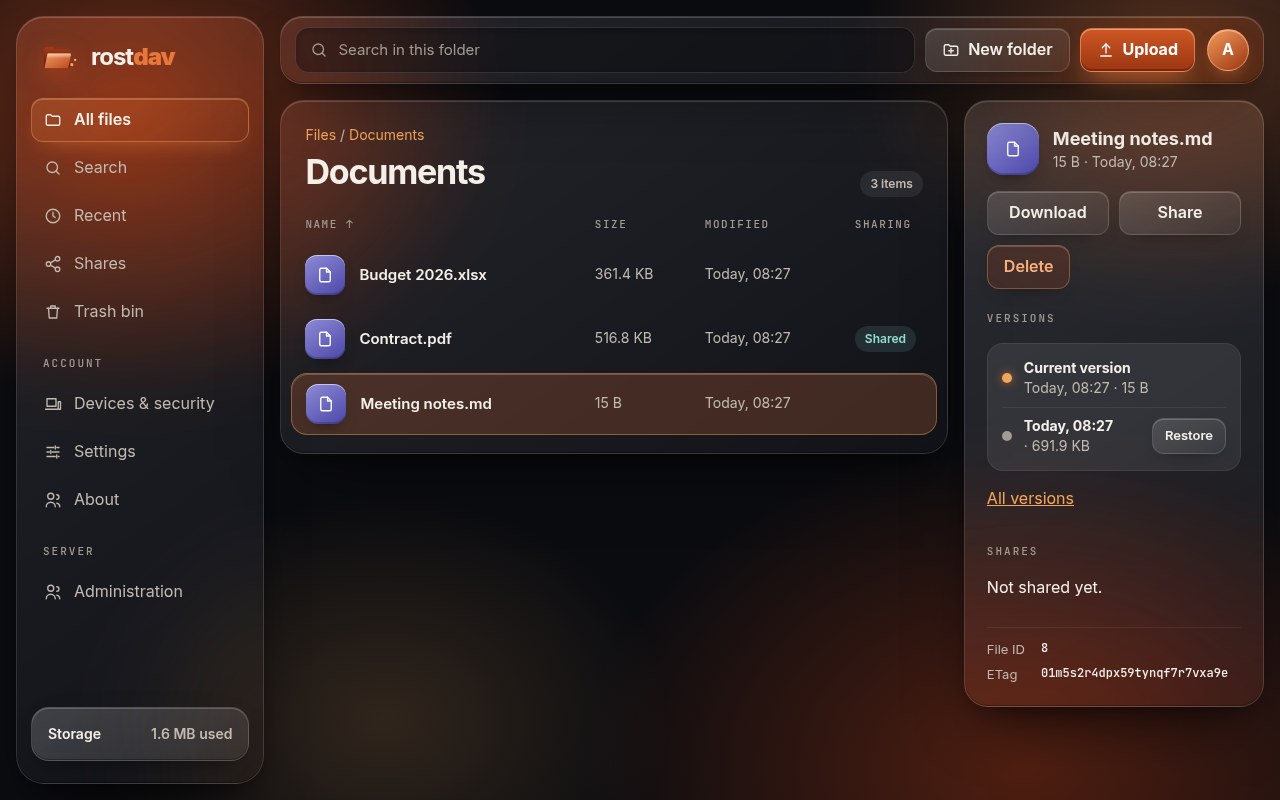
On a phone
On a narrow screen the sidebar becomes a floating bar at the bottom with Files, Recent, Shares and More. More holds Search, Trash bin, Devices & security, Settings, About, Administration (administrators) and Sign out. Tapping a file opens its details as a sheet from the bottom; tap the dimmed area or the handle to close it. Upload and New folder are the round buttons above the bar.
Upload
- Drag and drop files, or whole folders, anywhere onto the page. Empty folders are created as well.
- Or use the upload button, with Choose files or Choose a folder.
- One progress bar covers the whole batch. A file that cannot be stored (for example because its name is refused) is listed at the end; the rest still uploads.
Large files are uploaded in pieces that can be resumed if the connection drops. If your browser blocks scripts, the plain upload form still works for single files.
Names cannot contain /, \ or control characters, cannot be . or .., and can be at most 255 bytes long. Files whose names end in .part or .filepart are refused, because the Nextcloud apps use those endings for unfinished transfers.
New folder, download, delete
- New folder makes a folder in the open folder.
- Download saves the file; folders are not downloaded as a whole in the browser (use the desktop app for that, or the data export in Settings).
- Delete asks for confirmation and moves the item to the trash bin. It is not gone yet.
Quota
If your administrator set a quota, the storage meter shows how much is used. Older versions and trash count toward your quota until they are removed.
Favorites
Mark a file or folder as a favorite in a Nextcloud app. Favorites are kept on the server, so they show in all your apps.